Moin,
anbei mal ein Code, der etwas abstellt was mich bei plenty nervt. Es geht um die Suche in den Aufträgen. Man ist so getriggert, das man etwas eingibt und enter drückt. Nur leider erwartet plenty eine Auswahl.
Bei uns ist das häufigste Auftrags ID oder Name. Ich habe die Reihenfolge so eingestellt, das erst die ID kommt. Wenn man nun aber einen Namen eingibt und enter drückt steht da ID und der Name > Ergebniss keine anzeige. Also löschen, Name eingeben, enter, ach mist schon wieder ID. Also nochmal und diesmal dann mit der Maus Kundendaten ausgewählt. Tausende nervige klicks Pro Jahr.
Wenn das auch stört. Hier der passende code.
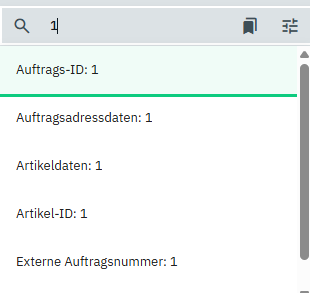
Er bewirkt das wenn ich eine Zahl eingebe, die ID oben bleibt (also bewirkt er hier eigentlich gar nichts 
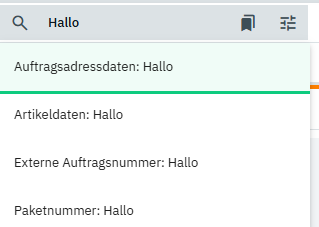
Wenn ich nun aber den Namen eingebe entfernt der Code die ID und Aufrtragsdaten rutscht nach oben und ich kann einfach enter drücken.
Also wen das Nervt hier der Code.
Noch ein paar wichtige Infos. Ich nutze es in Chrome, keine ahnung ob es so auch einem anderen Browser geht. Ich übernehme keine Haftung für irgendwas. Ihr macht das auf euer Risiko. Ihr könnte Code gerne von Chatgpt checken lassen.
Ihr benötigt Tempermonkey und diesen Code:
(diese Zeile // @match ://p7615.my.plentysystems.com/ müsst Ihr auf euch anpassen)
// ==UserScript==
// @name Plenty: Auftrags-ID & Artikel-ID entfernen + Vorauswahl (prod)
// @namespace http://tampermonkey.net/
// @version 4.5
// @description Entfernt „Auftrags-ID“ & „Artikel-ID“ aus der Autocomplete-Liste, markiert erste gültige Option visuell und wählt sie erst bei Enter. Produktiv, keine Debug-Logs.
// @match ://p7615.my.plentysystems.com/
// @run-at document-idle
// @grant none
// ==/UserScript==
(function () {
‚use strict‘;
const REMOVE_KEYWORDS = ['Auftrags-ID', 'Artikel-ID'];
const DEBOUNCE_MS = 160;
let searchField = null;
let listenersAttached = false;
let processTimer = null;

function isVisible(el) {
    if (!el) return false;
    const r = el.getBoundingClientRect();
    return r.width > 0 && r.height > 0;
}

function findSearchField() {
    const active = document.activeElement;
    if (active && active.tagName && active.tagName.toLowerCase() === 'input' && isVisible(active)) {
        return active;
    }
    const sel = 'input[type="text"], input[type="search"], input[placeholder], input[aria-label]';
    const inputs = Array.from(document.querySelectorAll(sel)).filter(isVisible);
    if (inputs.length) {
        inputs.sort((a,b) => (b.value||'').length - (a.value||'').length);
        return inputs[0];
    }
    return null;
}

function collectOptionElements() {
    let opts = [];
    try { opts = opts.concat(Array.from(document.querySelectorAll('mat-option'))); } catch (e) {}
    try {
        const overlays = Array.from(document.querySelectorAll('.cdk-overlay-container, .cdk-overlay-pane'));
        overlays.forEach(container => {
            try { opts = opts.concat(Array.from(container.querySelectorAll('mat-option, [role="option"], li, .mat-mdc-option'))); } catch (e) {}
        });
    } catch (e) {}
    const uniq = Array.from(new Set(opts)).filter(el => el && isVisible(el));
    return uniq;
}

function hideOption(opt) {
    try {
        opt.setAttribute('aria-hidden', 'true');
        opt.hidden = true;
        opt.style.display = 'none';
    } catch (e) { /* still continue silently */ }
}

function showPreselect(el) {
    document.querySelectorAll('.tm-preselect-outline').forEach(x => {
        x.classList.remove('tm-preselect-outline');
        x.style.outline = '';
        x.style.backgroundColor = '';
    });
    if (!el) return;
    if (!el.id) el.id = `tm-opt-${Date.now()}-${Math.random().toString(36).slice(2,8)}`;
    el.classList.add('tm-preselect-outline');
    el.style.outline = '3px solid rgba(0,200,120,0.95)';
    el.style.backgroundColor = 'rgba(0,200,120,0.06)';
}

function processDropdown() {
    if (processTimer) { clearTimeout(processTimer); processTimer = null; }
    if (!searchField) searchField = findSearchField();
    const searchVal = searchField ? (searchField.value || '').trim() : '';
    const containsLetters = /[a-zA-ZÄÖÜäöüß]/.test(searchVal);
    const opts = collectOptionElements();
    if (!opts.length) return;

    let firstValid = null;
    for (const o of opts) {
        const txt = (o.textContent || '').trim();
        if (containsLetters && REMOVE_KEYWORDS.some(k => txt.includes(k))) {
            hideOption(o);
        } else {
            if (!firstValid) firstValid = o;
        }
    }
    if (firstValid) {
        showPreselect(firstValid);
        try { if (searchField) searchField.setAttribute('aria-activedescendant', firstValid.id); } catch (e) {}
    } else {
        showPreselect(null);
    }
}

function scheduleProcess() {
    if (processTimer) clearTimeout(processTimer);
    processTimer = setTimeout(processDropdown, DEBOUNCE_MS);
}

function onEnterHandler(ev) {
    if (ev.key === 'Enter') {
        ev.stopPropagation();
        ev.stopImmediatePropagation();
        ev.preventDefault();
        const active = document.querySelector('.tm-preselect-outline') || document.querySelector('.mat-mdc-option-active');
        if (active) {
            active.dispatchEvent(new MouseEvent('mousedown', { bubbles: true, cancelable: true }));
            active.dispatchEvent(new MouseEvent('mouseup', { bubbles: true, cancelable: true }));
            active.dispatchEvent(new MouseEvent('click', { bubbles: true, cancelable: true }));
        }
    }
}

function attachListenersOnce() {
    if (listenersAttached) return;
    listenersAttached = true;

    window.addEventListener('keydown', onEnterHandler, true);

    const inputObserver = new MutationObserver(() => {
        const f = findSearchField();
        if (f && f !== searchField) {
            searchField = f;
            if (!f.__tm_input_hooked) {
                f.__tm_input_hooked = true;
                f.addEventListener('input', scheduleProcess, { passive: true });
                f.addEventListener('keyup', scheduleProcess, { passive: true });
            }
        }
    });
    inputObserver.observe(document.body, { childList: true, subtree: true });

    const overlayObserver = new MutationObserver((mutations) => {
        for (const m of mutations) {
            if (m.addedNodes.length || m.removedNodes.length) {
                scheduleProcess();
                break;
            }
        }
    });
    overlayObserver.observe(document.body, { childList: true, subtree: true });
}

// Startup
setTimeout(() => {
    try {
        attachListenersOnce();
        searchField = findSearchField();
        if (searchField && !searchField.__tm_input_hooked) {
            searchField.__tm_input_hooked = true;
            searchField.addEventListener('input', scheduleProcess, { passive: true });
            searchField.addEventListener('keyup', scheduleProcess, { passive: true });
        }
        scheduleProcess();
    } catch (e) { /* silent fail in prod */ }
}, 900);
})();
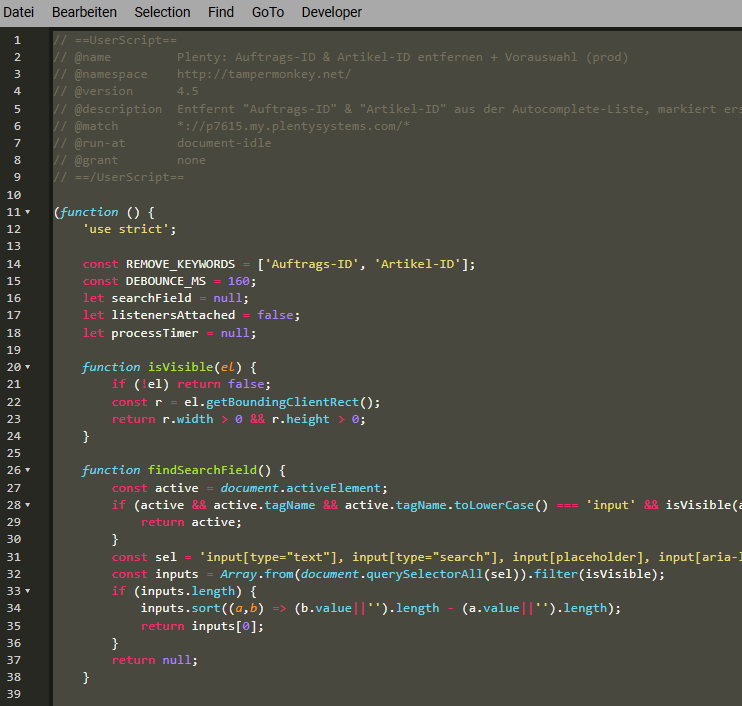
So sieht es dann in Tempermonkey aus:
Bitte habt verständniss, dass ich keinen Support dafür bieten kann. Ich nutze den Code jetzt bestimmt ein Jahr. Vor einigen Wochen musste ich Ihn anpassen. Weil plenty was geändert hatte.
Der Code kann sicher noch indivualsiert werden (e-mail) aber für uns reicht er so.
Viele Grüße
Marco


